
 Finance
Track and manage every asset with ease
From acquisition to depreciation to disposal, Wizard Cloud ERP helps you manage your fixed assets with complete visibility, automated calculations, and accurate reporting.
Updated August 2026
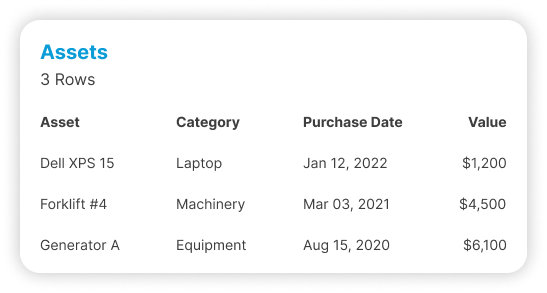
| Asset | Cost | NBV | Status |
|---|---|---|---|
| Delivery truck · TR-04 | 68,000 | 41,200 | In service |
| Forklift · Zalka | 34,500 | 18,900 | In service |
| Cold room compressor | 22,800 | 9,400 | Service due |
| Office fit-out · HQ | 96,000 | 52,700 | In service |
| Server rack · DC1 | 18,400 | 3,100 | Near end of life |
Stay in control of your assets

Location-based tracking
Know where every asset is, down to the floor, room, and section, using barcode or QR codes.

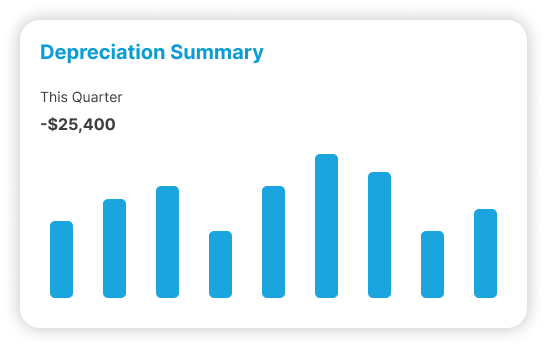
Automated depreciation
Calculate and post monthly depreciation entries without lifting a finger.
- Vehicles$4,820
- Machinery$3,560
- IT equipment$1,980
- Fit-out$1,340
Assets that work as hard as you do
Simplify asset management with centralized control over categories, purchases, locations, and lifecycle events, from acquisition to sale or disposal.
Full lifecycle management for your fixed assets
Automate the tedious parts of asset tracking and focus on maximizing value and control.

Asset categorization
Group assets by type, department, or custom tags to stay organized.

Depreciation management
Define depreciation methods, rates, and useful life per asset.

Asset catalogue
Maintain a searchable registry of assets with photos and technical details.

Barcode & QR code assignment
Generate unique codes for physical tagging and fast scanning.

Asset expenses
Log and track repairs, maintenance, and other asset-related costs.

Purchase tracking
Track asset purchases and link them to POs and supplier records.

Auto depreciation entries
Generate and post monthly depreciation entries automatically to the ledger.

Location tracking
Assign assets to branches, buildings, floors, rooms, or zones.

Asset disposal & sale
Record sales, write-offs, or transfers of assets with complete accounting entries.

Bulk asset upload
Import large volumes of asset records via structured Excel templates.
Who runs Fixed Assets
The sectors where this one does the most work. Each has its own page.




Why does the asset register never match what is in the building?
Because assets get bought, moved and scrapped by people who have no reason to tell finance. The register drifts until it lists items that no longer exist and misses items that do. Tagging each asset and tying every purchase and movement to a record is what stops the drift.
Auditors call the leftovers ghost assets. A company depreciating equipment it no longer owns is overstating its balance sheet, and a company using equipment that was never capitalised is understating it. Both get found eventually, usually at the worst time.
The everyday cost is smaller and more irritating. Insurance renewed on a list nobody trusts. A purchase approved for equipment that already sits unused in another branch. A departing manager whose laptop nobody thinks to ask for.
How does an asset get onto the register in the first place?
From the purchase. An asset bought through procurement carries its supplier, purchase order and cost onto the asset record, so it is capitalised when it is received rather than found months later by an accountant reading expense lines. Assets you already own are loaded in bulk from a spreadsheet at setup.
The usual failure is quiet. A machine is bought, coded to repairs and maintenance because that was the nearest account, and depreciation that should have run over five years lands entirely in one month. The profit figure is wrong twice: once now, and once in every year that follows.
Categories carry the accounting decision. Each one holds its default depreciation method, rate and useful life, so the person creating the asset chooses what the thing is rather than how to account for it. That is the difference between a register a storekeeper can maintain and one only finance can touch.
How do you run a physical asset audit without losing a week?
Tag each asset with a barcode or QR label and walk the building with a scanner. The register holds location down to branch, building, floor, room or zone, so what you find in a room is checked against what should be in that room instead of against one long company list.
Most of the time in an asset audit goes on identification rather than counting. Two identical laptops with no labels mean the person auditing is guessing, and a guess written into the register is worse than a gap left open.
Photos and technical detail on the asset record work the same way. A serial number, a picture and a location turn a verification into a two-second confirmation, which is what makes an annual audit survivable in a business with several hundred assets.
How much is this machine costing us to keep?
Repairs, maintenance and other costs are logged against the asset itself, so the total spent on one machine or one vehicle sits next to what it cost and what it is worth now. That is the number behind a sensible repair or replace decision, and most businesses have never seen it.
Maintenance spend normally disappears into a general expense account, split across dozens of invoices with no link to the thing being repaired. The result is a fleet where everybody suspects which vehicle is the problem and nobody can prove it.
Once the costs sit on the asset, the argument changes. A truck that has taken three engine repairs in eighteen months stops being a run of bad luck and becomes a line you can put in front of the owner.
| Question about one machine | Without an asset register | With one |
|---|---|---|
| What did it cost | The invoice, if somebody finds it | Purchase cost, supplier and purchase order on the record |
| What is it worth now | A depreciation spreadsheet | Net book value, updated when depreciation posts |
| What have we spent repairing it | Nobody totals it | Every logged repair and expense against the asset |
| Where is it | Ask around | Branch, building, floor, room or zone |
| Is it still in use | Assumed | Status on the register, confirmed at the last audit |
Which depreciation method should each asset use?
That is your accountant's call, not the software's. What the system does is hold the method, rate and useful life per asset, then calculate and post the entries on schedule so nobody maintains a parallel depreciation spreadsheet or forgets the monthly journal. Different categories can run on different methods at once.
The honest caveat: automation removes the arithmetic, not the judgement. Useful life on a delivery truck working Lebanese roads is a decision a person has to make, and if that decision is wrong the entries will be wrong on time, every month, for years.
Where it does save real work is volume. A company with four hundred assets across five categories has four hundred small calculations a month. Done by hand, the errors compound quietly, and they are usually found by an auditor rather than by the person who made them.
Who is responsible for an asset once it leaves the store?
Whoever it is assigned to. Assets can be held against a branch, a department or a person, and moving one is recorded as a change rather than happening silently. When somebody leaves or a branch closes, you can list what is in their name and check it back in.
Accountability is the part software cannot supply on its own, but it can make the question answerable. Most disputes about missing equipment end quickly once there is a record of who signed for it and when.
The same structure covers the other end of the life. When an asset is sold or scrapped, the register and the ledger change together, so the balance sheet stops carrying something that left the building last year and the depreciation stops running on it.
Connected to the rest of the system
The Fixed Assets Module connects with other key business functions for accurate financial and operational control.

Accounting
Post entries automatically, reconcile the bank, and close the month without rebuilding it in Excel.

Procurement
Raise purchase orders, see what you last paid, and route approvals without an email chain.

Payroll
Payroll, attendance and end-of-service in one place, posting straight into the accounts.

Warehouse Management
Bins, zones and barcode picking, so the wrong item cannot leave the building.
Trusted by businesses across Lebanon and the Gulf





Businesses already running on Wizard
Wizard Cloud ERP completely streamlined our operations, online and in-store. From inventory syncing to order fulfillment, everything now runs smoother, faster, and with fewer errors.
AghasarkissianRetail, online and in-storeManaging multiple restaurants under one group was a challenge, until Wizard Cloud ERP stepped in. We now have better visibility, centralized control, and smoother day-to-day operations across every concept.
Al Mandaloun GroupHospitality, multi-outletWizard Cloud ERP brought structure and clarity to our luxury business. From sales tracking to customer experience, we now operate with precision while maintaining our premium standards.
Choucair GroupLuxury retailWizard Cloud ERP gave us full control over our multi-branch retail operations. We can manage inventory, sales, and customer data seamlessly, all from one platform.
K-LynnMulti-branch retailAs exclusive brand distributors, we needed visibility and flexibility. Wizard Cloud ERP helps us track every shipment, order, and partner account with confidence.
M. Nassif & FilsExclusive brand distributionHandling installations, service, and logistics at scale used to be complicated. With Wizard Cloud ERP, we now track every detail across departments; streamlined, connected, and always up to date.
OTISInstallation and field service
Questions we get asked
If yours is not here, ask on the demo call. We would rather tell you it is not a fit than sell you the wrong thing.
Ask us directlySee it running on your own numbers
Bring one messy process, the one that eats your week, and we will show you what it looks like inside Wizard. If it is not a fit, we will say so.
- Thirty minutes, and you can bring your finance person
- We look at the tools you run today before we show you anything
- Nothing to sign and no card needed
- 1You tell us what is breakingA short form: your sector, rough size, and the process that hurts most.
- 2We come back within one working dayWith whether we are a fit, and which modules would actually apply.
- 3A demo built around your caseNot a generic tour. Your workflow, your kind of data.