
 Operations
Track, manage, and optimize your inventory
Track, organize, and control your stock across warehouses, categories, and units. Wizard Cloud ERP gives you complete visibility and automation for every product, in every location.
Updated August 2026
| Warehouse | Units | Value | Status |
|---|---|---|---|
| Beirut · Main | 3,940 | $512,400 | Healthy |
| Zalka · Overflow | 2,180 | $298,600 | Healthy |
| Tripoli · Branch | 1,412 | $204,900 | Low on 6 SKUs |
| Dubai · Transit | 880 | $124,700 | In transit |
Track stock your way

Multi-warehouse management
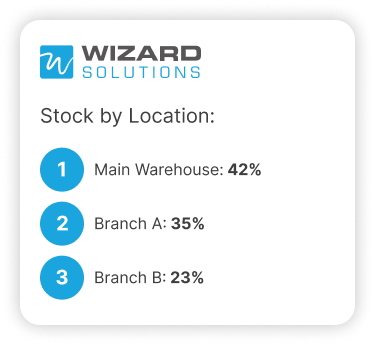
Monitor inventory across all locations with real-time quantity updates and stock transfers.

Smart categorization
Tag products using over 10 features including type, brand, batch, expiry, and more.
- Low
Cable 2.5mm · 100m
12 left, min 50
- Low
Battery 12V 70Ah
8 left, min 40
- Watch
Filter cartridge
31 left, min 30
Say goodbye to stock surprises
Avoid stockouts, eliminate over-ordering, and reduce waste with automated reordering, batch tracking, and expiry alerts, all built into your ERP.
Complete inventory control, from a to z
Packed with features to manage complex stock structures and simplify day-to-day operations.

Multi-warehouse tracking
Monitor inventory levels and movements across all your warehouses in real time.

Unit & packing management
Define units of measure and packaging combinations for accurate transactions.

Barcode & QR code integration
Generate barcodes and scan items for receiving, counting, and sales.

Inventory reordering automation
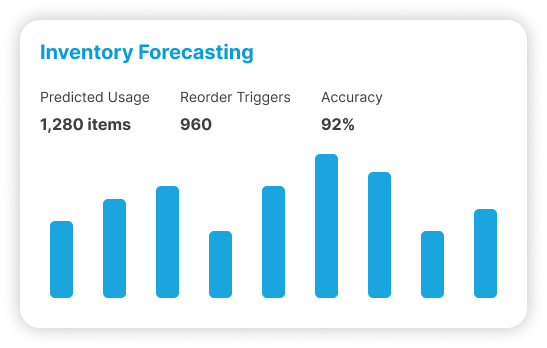
Trigger restocks automatically when items fall below defined thresholds.

Stock count & adjustments
Count inventory by item or group and apply differences with approval.

Product catalogue builder
Create a structured catalog of all your products with images and detailed specs.

Product categorization
Classify items by category, brand, size, color, material, or any attribute you need.

Expiry, lot & serial tracking
Track product batches by expiry dates, lot numbers, or serial codes.

Bulk product upload
Import thousands of SKUs and their details using structured Excel templates.

Warehouse replenishment
Redistribute stock between locations with automated replenishment suggestions.

Item aging report
View how long items have been in stock and optimize your inventory turnover.

Inventory valuation
Calculate costs using average or landed cost methods for more accurate reporting.
Who runs Inventory
The sectors where this one does the most work. Each has its own page.




Where does stock go missing between the shelf and the system?
Almost always at a handover. Goods moved between branches on a phone call, a delivery topped up from the van, a short delivery signed for in full. Each one is a movement nobody documented. The fix is not stricter people, it is making every movement create a record at the moment it happens.
Every business with a stock problem has the same conversation. The report says forty, the shelf has thirty-one, and the argument becomes about who is wrong rather than about where the nine went.
A stock system does not stop goods from walking out of the building. What it does is shorten the search. When receiving, transfers, picking and sales each leave a document with a name and a time on it, a gap between the count and the record has a short list of possible causes instead of a long one.
| Where stock disappears | What actually happened | What the system needs in place |
|---|---|---|
| Between branches | Goods moved after a phone call, paperwork followed later or never | A transfer raised when the goods leave, closed when they arrive |
| On delivery | The driver took extra units to save a second trip | Picking confirmed against the order, by scan |
| At receiving | A short delivery was signed for and the invoice paid in full | Receipt matched against the purchase order |
| Samples and returns | Given away or taken back, never written off | An adjustment with a reason and an approver |
| At the counter | Sold without a document | Every sale creates a stock movement |
How do you count stock without shutting the warehouse for a weekend?
Count in slices. Stock counts can be run by item, by group, by brand or by category, so a team checks the fast-moving lines this week and the slow ones next month. Differences are applied as adjustments that need approval rather than being edited quietly into the record.
The annual full count is a ritual most businesses would rather not repeat, and it is also the least useful way to find a problem. A count in January tells you something went wrong at some point in the previous twelve months.
Rolling counts on a schedule catch the same errors while they are still traceable to a week and a person. Barcode scanning makes the count faster and removes the transcription mistakes that usually force a second round of counting.
The approval step on adjustments is the part companies skip and then regret. If any storekeeper can write off a difference, the record stays clean and the losses stay invisible.
How does it handle buying in cartons and selling in pieces?
Each item can carry more than one unit of measure with the packing relationship between them, so you buy a pallet, hold cartons and sell singles without anybody doing arithmetic. Stock, costing and reporting all convert back to the same base unit, which is what keeps the numbers comparable.
This sounds like a detail until you see what it costs when it is missing. Businesses without it end up creating three item codes for the same product and lose the ability to answer how many they actually hold.
Packing definitions matter at the point of sale too, because pricing often differs by pack. A case price and a unit price can both be correct at the same time, as long as the system knows the relationship between them.
Barcodes are generated from the same item structure, so scanning at receiving and scanning at the counter land on the right quantity rather than on two versions of it.
What is our stock actually worth?
Valuation runs on average cost or on landed cost, so the value on your balance sheet reflects what the goods cost to reach your warehouse rather than the supplier's invoice line alone. Because stock movements post to accounting as they happen, the stock figure and the ledger do not need reconciling afterwards.
Landed cost is where importers lose margin without noticing. Freight, customs, clearing and local transport arrive as separate invoices, often weeks apart, and unless they are allocated back to the goods they sit as general expenses. Every item then looks cheaper than it was, and every margin report is optimistic.
The honest caveat: the system is only as accurate as the day you start it. Opening quantities and opening costs are loaded from a physical count, and a rushed count carries its error forward into every valuation after it. Taking two extra days at the beginning is worth more than any report you will run later.
Average cost
Cost moves as new stock arrives at different prices, which suits fast-moving goods.
Landed cost
Shipping, customs and handling are spread across the items in the shipment they belong to.
Posted as goods move
Cost of goods sold is recorded with the sale instead of calculated at month end.
How do we find the stock that is not moving?
The item aging report shows how long each item has been sitting, so slow lines are visible by age rather than by feel. Read next to turnover per item and per location, it tells you which stock is holding cash that could be paying for goods customers actually ask for.
Dead stock is rarely a decision. It builds up from good intentions: a bulk deal that looked cheap, a discontinued line nobody wrote off, a customer order that fell through and was never sold on to anyone else.
For perishable or regulated goods the same question gets sharper, because expiry and lot tracking turn age into a deadline. Stock approaching its expiry date can be found and moved while it is still worth something.
What happens when stock moves between branches?
A transfer becomes a document rather than a phone call. Goods leave one location and arrive at another, and the movement is logged instead of assumed. Replenishment compares stock against reorder levels set per location, so the branch that is short can be topped up from the branch that is long.
Multi-branch businesses lose more stock to informal transfers than to theft. Somebody needs two units, drives over, takes them, and intends to tell the office later. Multi-branch groups run on Wizard, Al Mandaloun Group and Choucair Group among them, and this is the first habit that has to change.
Reorder levels sit per item and per location for the same reason. A downtown branch and a central warehouse do not need the same cover on the same product, and one company-wide minimum quantity produces shortages in one place and dead stock in another.
Connected to the rest of the system
The Inventory Management Module connects without extra work with other business functions to ensure efficient stock control.

Procurement
Raise purchase orders, see what you last paid, and route approvals without an email chain.

Accounting
Post entries automatically, reconcile the bank, and close the month without rebuilding it in Excel.

Warehouse Management
Bins, zones and barcode picking, so the wrong item cannot leave the building.

E-Commerce
Your online store reads the same stock number your branches do.
Trusted by businesses across Lebanon and the Gulf





Businesses already running on Wizard
Wizard Cloud ERP completely streamlined our operations, online and in-store. From inventory syncing to order fulfillment, everything now runs smoother, faster, and with fewer errors.
AghasarkissianRetail, online and in-storeManaging multiple restaurants under one group was a challenge, until Wizard Cloud ERP stepped in. We now have better visibility, centralized control, and smoother day-to-day operations across every concept.
Al Mandaloun GroupHospitality, multi-outletWizard Cloud ERP brought structure and clarity to our luxury business. From sales tracking to customer experience, we now operate with precision while maintaining our premium standards.
Choucair GroupLuxury retailWizard Cloud ERP gave us full control over our multi-branch retail operations. We can manage inventory, sales, and customer data seamlessly, all from one platform.
K-LynnMulti-branch retailAs exclusive brand distributors, we needed visibility and flexibility. Wizard Cloud ERP helps us track every shipment, order, and partner account with confidence.
M. Nassif & FilsExclusive brand distributionHandling installations, service, and logistics at scale used to be complicated. With Wizard Cloud ERP, we now track every detail across departments; streamlined, connected, and always up to date.
OTISInstallation and field service
Questions we get asked
If yours is not here, ask on the demo call. We would rather tell you it is not a fit than sell you the wrong thing.
Ask us directlySee it running on your own numbers
Bring one messy process, the one that eats your week, and we will show you what it looks like inside Wizard. If it is not a fit, we will say so.
- Thirty minutes, and you can bring your finance person
- We look at the tools you run today before we show you anything
- Nothing to sign and no card needed
- 1You tell us what is breakingA short form: your sector, rough size, and the process that hurts most.
- 2We come back within one working dayWith whether we are a fit, and which modules would actually apply.
- 3A demo built around your caseNot a generic tour. Your workflow, your kind of data.