
 Operations
Track projects. control budgets. deliver on time.
Wizard Cloud ERP helps you break down projects, assign budgets, track stock usage, and generate real-time reports, so you stay in control from start to finish.
Updated July 2026
| Project | Budget | Spent | Status |
|---|---|---|---|
| Achrafieh fit-out | $284,000 | $196,400 | On track |
| Zalka warehouse | $412,000 | $389,900 | At risk |
| Hamra retail unit | $148,000 | $62,100 | On track |
| Jounieh clinic | $96,000 | $98,700 | Over budget |
Manage complex projects with clarity

Subdivision structure
Divide your projects into categories, divisions, and sub-divisions for organized execution.

Budget & expense control
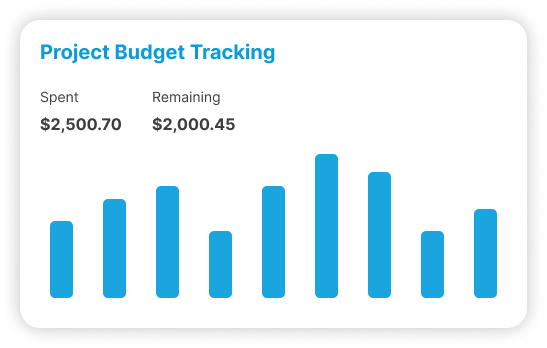
Set budgets and track actual costs across each project layer in real time.
- Due
Achrafieh · MEP sign-off
Thu
- Overdue
Zalka · Progress claim 4
Fri
- Done
Hamra · Materials on site
Wed
Built for project-driven businesses
Whether you’re managing construction jobs, events, or multi-phase initiatives, Wizard keeps your teams aligned and your numbers accurate, with full stock and cost visibility across every step.
All-in-one ERP for project execution & reporting
From cost control to material tracking, manage every aspect of your projects in one place.

Project creation & breakdown
Define projects and divide them into unlimited levels of categories and subdivisions.

Expense allocation
Distribute expenses across projects and subdivisions automatically or manually.

Report by division
Generate reports for any level, project, division, or sub-division, instantly.

Budget setup & monitoring
Assign budgets per division and monitor actual vs planned costs in real time.

Material consumption tracking
Track items, stock, and resources consumed per project or division.

Integrated cost management
Link your procurement, accounting, and inventory directly to each project’s cost center.
Who runs Project Management
The sectors where this one does the most work. Each has its own page.




Why do project costs only become clear after the project ends?
Because they arrive from different places and get recorded in different systems. Materials leave the store, a subcontractor invoices six weeks later, and payroll posts one wages figure for the month. Nothing ties any of it to a specific job until somebody sits down afterwards and tries to piece it together.
By then the work is done and the money is gone. Whatever you learn turns into a rough allowance on the next quote, which is why so many companies price from habit and memory rather than from what their last five jobs actually cost them.
Project management in the ERP works the other way round. A cost is coded to a project at the moment it happens, because the purchase order, the stock issue and the supplier invoice all pass through the same system anyway. The project view builds continuously instead of being assembled at the end.
How far should you break a project down?
Far enough that a division matches how somebody actually reports on the work, and no further. Projects can be split into categories, divisions and sub divisions with as many levels as you want, but every level is a coding decision somebody makes under pressure on site. Three levels is usually plenty.
The temptation is to build a structure that answers every question you might ever have. Then a storekeeper issuing cement at seven in the morning has to choose between eleven sub divisions, and he picks the first one on the list. Your report is now detailed and wrong.
A structure people can code correctly without thinking is worth more than a precise one they guess at. You can always add a level later for a job that needs it. Removing one after a year of transactions is a much harder conversation.
Where do project costs come from?
From the modules that were going to record them anyway. Purchases are coded to the project when the order is raised, materials are charged when they are issued from stock, salaries can be allocated from payroll, and direct expenses are coded on entry. There is no separate project cost sheet to maintain.
Because costs land as they occur, the comparison against budget is live. A division sitting at 80% of its budget with half the work still to do is visible in week six, which is while you can still change the plan, move people or renegotiate something.
| Cost type | Where it enters the system | What the project sees |
|---|---|---|
| Materials bought for the job | Purchase order, then supplier invoice | Charged to the project and its division |
| Materials taken from stock | Stock issue from the main store or the site | Consumption recorded at cost |
| Labour | Payroll run, by cost centre | Allocated to the project rather than to one wages line |
| Subcontractors | Their invoice, entered in payables | Sits against the project with everything else |
| General expenses | Coded when the expense is recorded | Distributed across the divisions you choose |
How do materials get charged to the right site?
By treating each site or project store as its own stock location. Material sent from the main warehouse to a site is a transfer, and material used on the job is an issue against that project. Both are recorded, so what was delivered and what was consumed stay two separate numbers.
This is where contractors lose money without noticing. Steel arrives on site, gets used across three jobs over a fortnight, and the whole delivery is charged to the first one because that is the project written on the delivery note.
Tracking consumption per project also gives you something to compare against. After a few similar jobs you have real usage figures from your own work instead of a supplier's rule of thumb, and estimating gets better because it stops being an opinion.
What can you report on that a profit and loss will not show?
Performance per project and per division. A company profit and loss says the business made money this quarter. A division level report says which jobs made it, which ones lost it, and where inside a job the loss happened, which is the difference between knowing and being able to do something.
The reports come from the same records finance works in, so there is no version of project performance that only project managers believe and a different one that goes to the board.
By project
Budget against actual cost, with the transactions behind each figure available.
By division
The same view one level down, so a loss can be located inside a job rather than blamed on it.
By material
What was consumed against what the estimate allowed for it.
Across similar jobs
Comparing finished projects to see whether your estimating assumptions still hold.
What is this not good at?
Detailed scheduling. The module is built around cost, budget and material consumption rather than critical path planning across hundreds of dependent tasks. If your planners live in scheduling software, leave them there. What this replaces is the cost side those tools never handled well.
Being direct about that saves an argument six months in. Companies buy an ERP expecting it to also be a planning tool, then feel let down for a reason that has nothing to do with what it is good at.
The honest caveat on the cost side too: reporting is only as good as the coding. If a third of purchase orders are raised without a project on them, you have a third of a project report. That is a habit problem, and it usually takes a few months of somebody checking before it settles.
Connected to the rest of the system
The Project Management Module integrates with key business functions to simplify execution and reporting.

Accounting
Post entries automatically, reconcile the bank, and close the month without rebuilding it in Excel.

Payroll
Payroll, attendance and end-of-service in one place, posting straight into the accounts.

CRM
Every lead, quote and conversation on one customer record, with their balance right there.

Procurement
Raise purchase orders, see what you last paid, and route approvals without an email chain.
Trusted by businesses across Lebanon and the Gulf





Businesses already running on Wizard
Wizard Cloud ERP completely streamlined our operations, online and in-store. From inventory syncing to order fulfillment, everything now runs smoother, faster, and with fewer errors.
AghasarkissianRetail, online and in-storeManaging multiple restaurants under one group was a challenge, until Wizard Cloud ERP stepped in. We now have better visibility, centralized control, and smoother day-to-day operations across every concept.
Al Mandaloun GroupHospitality, multi-outletWizard Cloud ERP brought structure and clarity to our luxury business. From sales tracking to customer experience, we now operate with precision while maintaining our premium standards.
Choucair GroupLuxury retailWizard Cloud ERP gave us full control over our multi-branch retail operations. We can manage inventory, sales, and customer data seamlessly, all from one platform.
K-LynnMulti-branch retailAs exclusive brand distributors, we needed visibility and flexibility. Wizard Cloud ERP helps us track every shipment, order, and partner account with confidence.
M. Nassif & FilsExclusive brand distributionHandling installations, service, and logistics at scale used to be complicated. With Wizard Cloud ERP, we now track every detail across departments; streamlined, connected, and always up to date.
OTISInstallation and field service
Questions we get asked
If yours is not here, ask on the demo call. We would rather tell you it is not a fit than sell you the wrong thing.
Ask us directlySee it running on your own numbers
Bring one messy process, the one that eats your week, and we will show you what it looks like inside Wizard. If it is not a fit, we will say so.
- Thirty minutes, and you can bring your finance person
- We look at the tools you run today before we show you anything
- Nothing to sign and no card needed
- 1You tell us what is breakingA short form: your sector, rough size, and the process that hurts most.
- 2We come back within one working dayWith whether we are a fit, and which modules would actually apply.
- 3A demo built around your caseNot a generic tour. Your workflow, your kind of data.